Evaluators
The “evaluators” are the tools in the solver to find two-side options that can be deleted.
They run through all remaining options for a segment and try to create a shape with multiple 2x2 pieces, for example a 3x3. If that succeeds, the option can stay. If it does not succeed to find a solution, it concludes the option is not valid and it will be discarded from the database.
Evaluators have been implemented for the following shapes:
- Single location (1x1)
- Square of 2x2 locations (4 locations filled), 64 start locations
- Square of 3x3 locations (9 locations filled), 36 start locations (top-left)
- Square of 4x4 locations (16 locations filled), 25 start locations (top-left)
- Square of 5x5 locations (25 locations filled), 16 start locations (top-left)
- A line of 8x1 along any of the 4 sides (8 locations filled)
- A line of 8x2 along any of the 4 sides (16 locations filled)
- A line of 8x3 along any of the 4 sides (24 locations filled)
- Square of 2x2 in all 4 corners at the same time (16 locations filled)
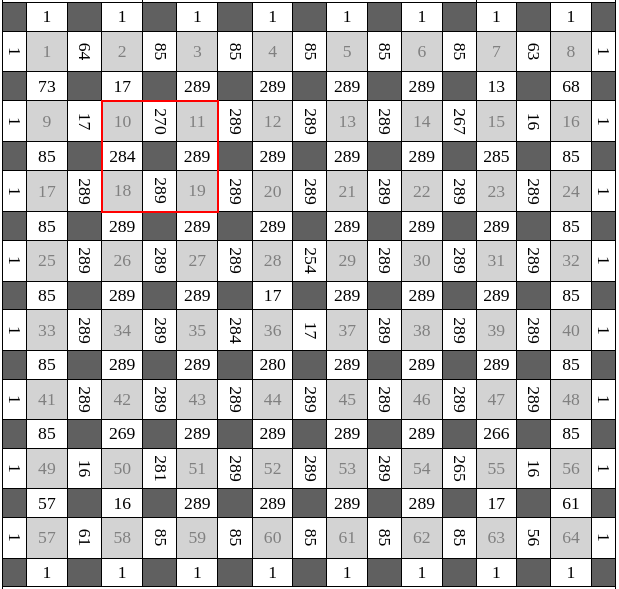
The evaluators use backtracking to run through all the possibilities (starting with a specific segment option) and stop the search as soon as a solution is found.
Depending on the shape size, the solvers check all options for specific segments:
- 1x1: check all 4 outer segments (around the location)
- 2x2: check the 4 inner segments that connect the locations (see image above)
- 3x3: check the 12 inner segments, starting with the 4 core inner segments
- 4x4: check the 17 inner segments
- etc.
In pseudo-code:
for side in get_segment_options(segment_nr):
    found_solution = find_solution(side)
    if not found_solution:
        delete_from_database(side, segment_nr)
Small note: a 3x3 evaluator tries to place 9 2x2 pieces, which is 4x9 = 36 base pieces or 15% of the original puzzle. The 4x4 evaluator places 25% of the original puzzle.